








 AMZ Sales Booster

















 Avg. +47% organic sales
 HELP CENTER


- Step 0: Confirm the Drop Is Real
- Step 1: Is It a Traffic Problem?
- Step 2: Is It a Ranking Problem?
- Step 3: Is It a PPC Problem?
- Step 4: Is It a Conversion Problem?
- Step 5: Is It a Buy Box Problem?
- Step 6: Is It an Inventory Problem?
- Step 7: Is It a Reviews/Rating Problem?
- Step 8: Is It a Pricing Problem?
- Step 9: Is It a Competition Problem?
- The Full Decision Tree
- Diagnostic Scorecard: Rate Yourself on Each Checkpoint
- Frequently asked questions
- Putting It Into Practice
Step 0: Confirm the Drop Is Real
Before troubleshooting, rule out false alarms. Compare the current period against the same period last year, not just last week. Many categories have built-in seasonality, and a “drop” in early January after a December spike is normal.
Also check for:
- Reporting lag. Business Reports can take 24-48 hours to fully populate; a “drop” that appeared yesterday may just be incomplete data.
- Order defect or account health flags. A quick look at Account Health can rule out a suppression you haven’t noticed yet.
- Marketplace-wide dips. If competitors in your category are reporting the same thing, this may be a demand shift, not a listing-specific issue.
If the decline holds up against a fair comparison period, move to Step 1.
Step 1: Is It a Traffic Problem?
Where to look: Business Reports → Sessions, Page Views.
If sessions are down at roughly the same rate as sales, the problem sits upstream of your listing; customers simply aren’t finding you. This is the most common root cause behind sellers asking “why are my Amazon sales down” when nothing on the listing itself has changed.
Traffic drops usually trace back to one of three things, which the next two steps will help you separate:
- Organic visibility loss (ranking)
- Paid visibility loss (PPC)
- Seasonal or category-wide demand shift (confirmed in Step 0)
If sessions are flat or up but sales are down, skip to Step 4 (Conversion). The problem isn’t visibility; it’s what happens after the click.
Step 2: Is It a Ranking Problem?
Where to look: Keyword rank tracker (or manual search checks) for your top 10-15 converting keywords.
Compare your current organic position against your position 30 days ago. A ranking-driven Amazon sales decline typically shows this pattern: sessions from organic search fall while paid sessions stay flat or rise, because customers are no longer seeing you in the top few organic rows for your core terms.
Common triggers for a ranking drop:
- A recent listing edit (title, bullets, backend keywords) that removed or diluted a keyword
- A gap in sales velocity that cost you your position in Amazon’s ranking algorithm
- Loss of the “indexed” status for a keyword after a category or attribute change
If you suspect indexation is the root issue rather than pure ranking position, that’s a deeper diagnostic in its own right.
If rank has genuinely fallen, that’s actionable, but also check Step 8 (Competition), since a new, faster-moving competitor can push you down without you changing anything at all.
Step 3: Is It a PPC Problem?
Where to look: Campaign Manager → Impressions, Clicks, ACoS, Budget utilization.
PPC-driven sales drops fall into two categories, and they require opposite fixes:
Impressions collapsed. Check for a paused campaign, a budget that’s running out early in the day (“budget exhausted” flag), a bid that fell below the winning range after a competitor raised theirs, or a Sponsored Products listing that lost its Buy Box (ads pause automatically without it; more on this in Step 5).
Impressions are fine, but ACoS spiked, and spending was throttled. This usually means the conversion rate fell on the ad side too, which points you back toward Step 4.
A quick gut check: if organic sessions are stable but total sales fell, and your ad spend for the period is noticeably lower than usual, PPC visibility loss is very likely your primary cause of Amazon sales suddenly dropping.
Step 4: Is It a Conversion Problem?
Where to look: Business Reports → Unit Session Percentage (conversion rate), compared over 30-60 days.
If sessions are flat but conversion rate has fallen, something changed about how the listing is being received, not how often it’s being seen.
Walk through:
- Main image change or suppression – a recent image update, or Amazon flagging non-compliant imagery
- Price display issues – a strikethrough price disappearing, or a coupon/deal badge expiring
- A+ Content or variation errors – broken images, missing swatches, or a variation family that split incorrectly
- Mobile rendering problems – bullets or title truncating awkwardly on mobile, where the majority of Amazon traffic now originates
If your conversion rate has been stagnant for a while rather than freshly dropped, that’s less an emergency diagnostic and more a structural audit worth running through a full listing review rather than a one-off fix.
Step 5: Is It a Buy Box Problem?

Where to look: Manage Inventory → Buy Box % eligibility column, or your third-party repricer dashboard.
Losing the Buy Box is one of the fastest ways to watch Amazon product sales drop to near zero, because most PPC ad types simply stop delivering impressions when you don’t hold it, and only a small share of shoppers manually click through to “other sellers.”
Common causes:
- A competing seller (including Amazon itself, or a hijacker) undercutting your price
- Landed price calculation issues after a shipping cost or tax change
- Account health metrics (late shipment rate, valid tracking rate) dipping below Buy Box eligibility thresholds
If you’re a single-seller ASIN (brand-owned, no resellers), Buy Box loss is less likely, but check anyway, since unauthorized resellers can still surface here.
Step 6: Is It an Inventory Problem?
Where to look: Manage Inventory → Inventory Performance Index (IPI), Restock, and “Fix Stranded Inventory” tab.
Inventory issues rarely announce themselves clearly; they show up as a ranking and Buy Box problem simultaneously.
Check for:
- Low or zero sellable inventory, especially at a specific fulfillment center, causing regional stockouts
- Stranded inventory from a listing or category change that broke the FBA-to-listing link
- Suppressed listings due to a compliance or safety flag, which removes the Buy Box entirely
- Excess long-term storage fees triggering an automatic price or visibility change if you’ve enabled automated pricing rules
An IPI score drop can also throttle your available storage, indirectly capping how much inventory you can even keep in stock, worth checking if this decline has been building for months rather than days.
Step 7: Is It a Reviews/Rating Problem?
Where to look: Product page star rating and review count, plus any recent 1-2 star reviews.
A sudden run of negative reviews, or a rating that crossed a visible threshold (e.g., from 4.3 to 3.9), can suppress both conversion rate and ranking simultaneously.
Look for:
- A batch of reviews referencing a specific defect (packaging, sizing, a recent formulation or supplier change)
- A merged variation pulling in reviews from a different, lower-rated child ASIN
- A review “bombing” pattern from a competitor or bad-faith actor, which is reportable to Amazon
This is one of the slower-moving causes on this list, but it compounds a rating dip that depresses conversion, which depresses ranking, which depresses traffic.
Step 8: Is It a Pricing Problem?
Where to look: Price history and a manual competitor price check.
Before touching the price, confirm it’s actually the lever that moved. A recent price increase (even a small one, or one triggered by an automated repricing rule) can quietly cost you both the Buy Box and the conversion rate at once.
Also check for:
- A coupon, Lightning Deal, or Prime Exclusive Discount that expired without you renewing it
- Currency or landed-cost changes if you sell cross-border
- A “reference price” or strikethrough price that Amazon removed for policy reasons
Price is often the seller’s first instinct when Amazon sales decrease, but based on the steps above, it’s rarely the first thing to check; it’s more effective as a targeted fix once you’ve confirmed the drop isn’t actually a traffic, ranking, or Buy Box issue that a price cut won’t solve anyway.
Step 9: Is It a Competition Problem?
Where to look: Search results for your top keywords, manually, in an incognito browser.
Sometimes nothing about your listing changed at all; a competitor simply out-executed you.
Look for:
- A new entrant with a lower price, better imagery, or a large launch-day PPC budget buying the top of page 1
- An existing competitor running a deep promotion or Lightning Deal that’s pulling share
- A category-wide price war compressing everyone’s conversion rate
This is the hardest cause to “fix” directly, but it’s important to rule in or out, because it changes your response. You compete on differentiation and content, not on emergency price cuts.
The Full Decision Tree
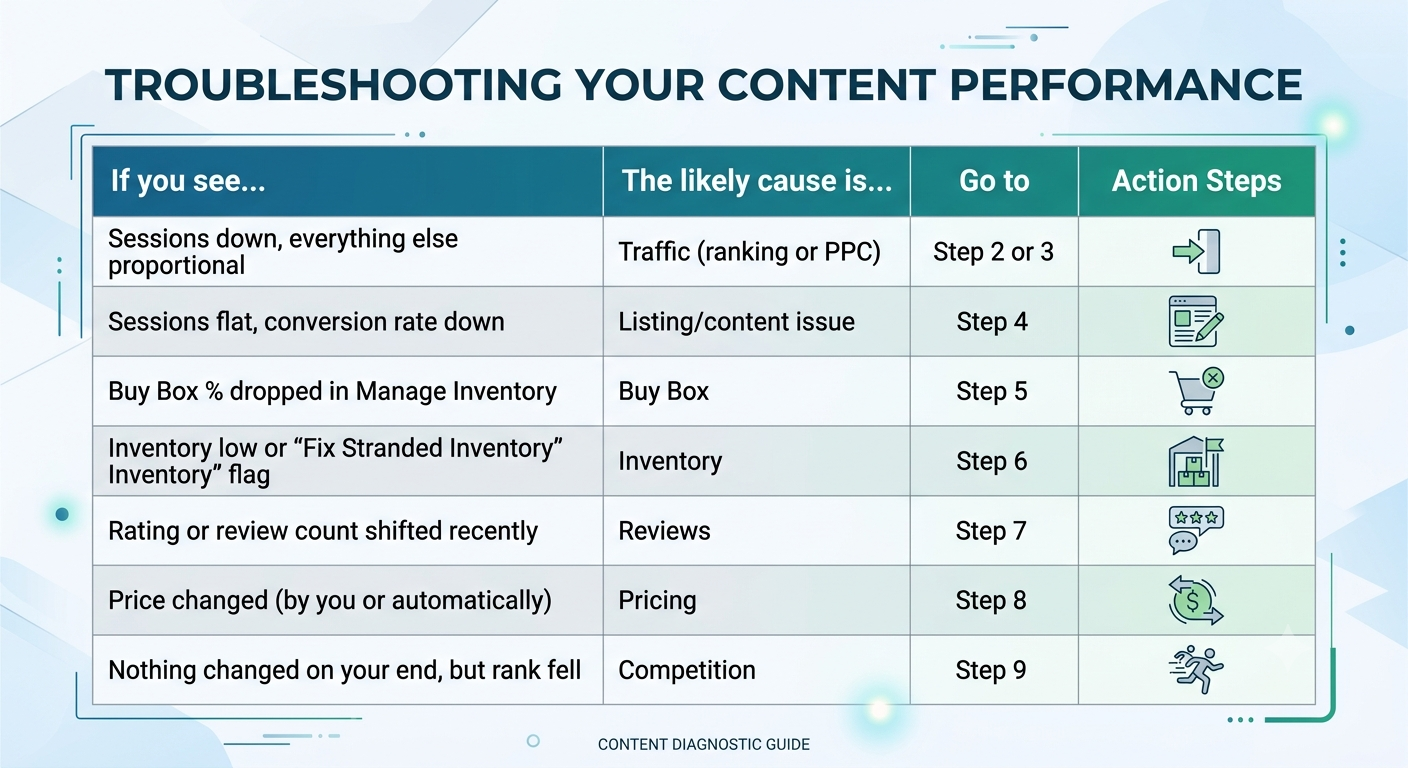
Use this sequence as a fast triage before diving into the detailed steps above:
Diagnostic Scorecard: Rate Yourself on Each Checkpoint
Score each area 0 (no issue found), 1 (minor issue), or 2 (likely root cause). Whichever checkpoint scores highest is where to focus first.
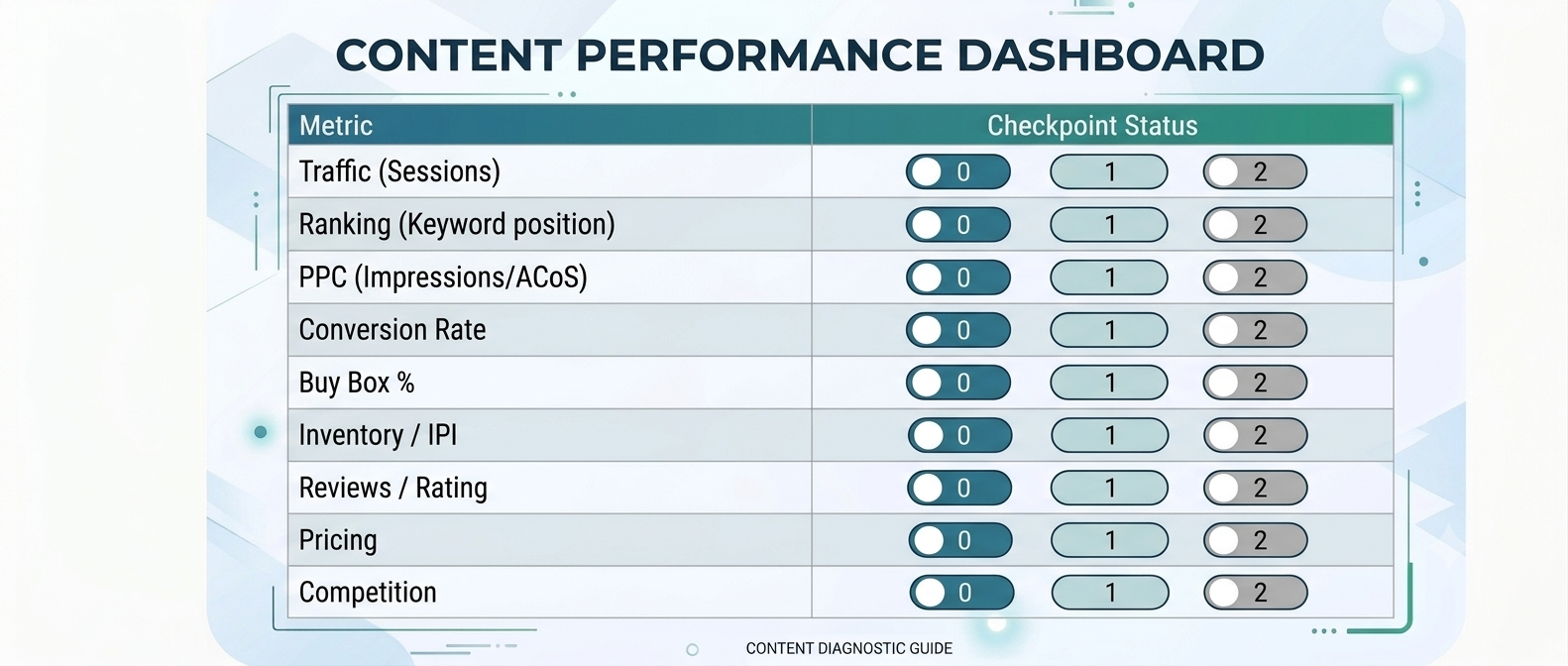
If two or more checkpoints score a 2, you likely have a compounding issue; for example, a Buy Box loss (Step 5) that’s simultaneously suppressing PPC (Step 3). Fix the upstream cause first; the downstream symptoms usually recover on their own within a few days once ad delivery and organic crawling catch up.
Frequently asked questions
1. Why did my Amazon sales suddenly drop with no warning?
The most common causes of a sudden, unexplained drop are a Buy Box loss, an inventory or stranded-listing issue, or a paused/exhausted PPC campaign. These can happen overnight without any visible change to your listing, which is why Steps 3, 5, and 6 above are worth checking first when the drop feels sudden rather than gradual.
2. How long should I wait before reacting to a sales dip?
Confirm the drop against the same period last year and allow 24-48 hours for reporting to fully populate (Step 0) before making changes. Reactive price cuts or listing edits made on incomplete data often create a second problem on top of the original one.
3. Can a bad review really cause an Amazon sales decrease?
Yes. A rating drop below a threshold like 4.0 stars measurably reduces conversion rate, and Amazon’s ranking algorithm factors in conversion performance, so a review problem can indirectly cost you both sales and search position over several weeks.
4. Is it normal for Amazon sales to decrease seasonally?
Yes, most categories have predictable seasonality. Always compare against the same period in the prior year, not just the previous week, before concluding something is actually wrong.
5. How important are reviews for Amazon conversions?
Very important. Listings with more reviews typically convert better, especially in competitive categories where buyers compare similar products.
Putting It Into Practice
An Amazon seller sales-down situation is almost never one single cause; it’s usually a starting issue (often inventory, Buy Box, or a listing edit) that cascades into ranking and PPC symptoms a few days later. Working through the checkpoints in order, rather than jumping straight to a price cut, is what separates a same-week recovery from a month of guessing.
If you’d rather have a second set of eyes run this diagnostic against your account data, our team runs this exact framework as part of every new account review.


